
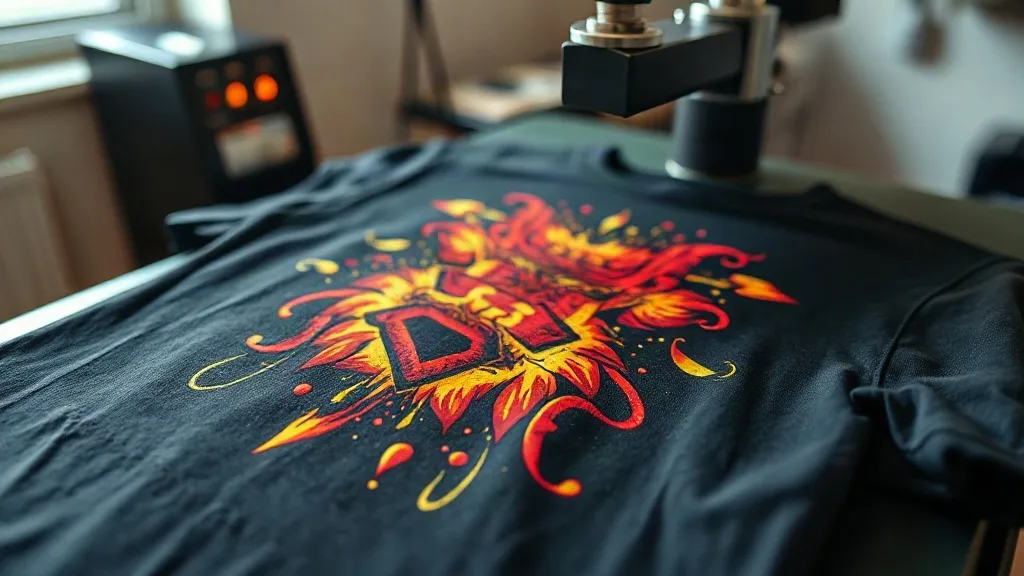
When it comes to dtf transfers, achieving stunning, vibrant prints that capture every detail is both an art and a science. Whether you're a seasoned professional or just starting out, understanding the factors that influence color accuracy and detail reproduction can dramatically elevate the quality of your work. In this guide, we'll dive deep into the world of dtf transfers, exploring how to master color and detail to produce prints that truly stand out.
Why Color and Detail Matter in DTF Printing
DTF printing has revolutionized the garment decoration industry by allowing for full-color, high-detail transfers that adhere to a wide range of fabrics. Unlike other methods, dtf transfers can reproduce intricate designs with photographic quality, making them ideal for complex artwork, gradients, and fine text. However, without proper attention to color management and detail optimization, even the best equipment can yield lackluster results.
Color accuracy ensures that your brand colors remain consistent across different garments and production runs. Detail reproduction determines how crisp lines, small text, and subtle textures appear on the final product. Both are critical for professional-looking prints that meet customer expectations.
Understanding the DTF Printing Process
Before we delve into optimization techniques, let's briefly review how DTF printing works. The process involves printing a design onto a special PET film using water-based pigments. A powdered hot-melt adhesive is then applied to the wet ink, and the film is cured. Finally, the transfer is pressed onto the fabric using a heat press. Each step presents opportunities to enhance or detract from color and detail.
The Role of Inks and Film
Not all DTF inks are created equal. High-quality pigment inks offer a wider color gamut and better longevity. Similarly, the PET film's coating affects ink absorption and release. Using compatible, reputable supplies is the foundation of excellent results.
Mastering Color Management
Color management is the key to achieving consistent, vibrant colors. It involves calibrating your printer, using ICC profiles, and understanding how different fabrics affect color appearance.
Calibrate Your Printer and Monitor
Start by calibrating your monitor to ensure what you see on screen matches what you'll get in print. Use a colorimeter for accuracy. Next, create custom ICC profiles for your printer, ink, and film combination. This step compensates for variations in equipment and materials.
Choose the Right ICC Profiles
ICC profiles are provided by printer and ink manufacturers, but for the best results, invest in custom profiling. This ensures that your printer reproduces colors as accurately as possible. When printing, always select the correct profile in your RIP software.
Account for Fabric Color
DTF transfers are printed on a white base, but the fabric color can still influence the final appearance, especially with lighter or sheer fabrics. For dark garments, the white ink layer acts as a base, but for light garments, you might reduce white ink to avoid a thick hand. Always test on the actual fabric you'll use.
Optimizing Detail Reproduction
Detail in DTF printing is largely determined by print resolution and the quality of the artwork. Here's how to ensure crisp, clear transfers.
Start with High-Resolution Artwork
Vector files are ideal as they can be scaled without loss of quality. For raster images, ensure they are at least 300 DPI at the final print size. Avoid upscaling low-resolution images, as this leads to pixelation and blurry prints.
Use the Right Print Settings
Your printer's resolution settings (e.g., 1440 dpi) and print mode (high quality) significantly impact detail. Higher resolutions produce finer dots, but they also consume more ink and time. Find a balance that suits your needs.
Manage Ink Limits and White Ink
Excessive ink can cause bleeding and loss of detail. Use RIP software to set appropriate ink limits. The white ink layer should be thick enough to provide opacity but not so thick that it cracks or feels heavy. Adjust white ink density based on fabric darkness.
Choosing the Right Materials for Color and Detail
The materials you use play a crucial role in the final output. Here's what to consider:
DTF Film Quality
Cheap films may not hold ink well or release it cleanly, leading to dull colors and poor detail. Invest in films designed for your printer and ink type.
Adhesive Powder
The adhesive powder affects the hand feel and durability. Finer powders (e.g., 80-170 microns) are generally better for detail and softness. Ensure the powder is evenly applied and cured properly.
Fabric Compatibility
DTF transfers work on almost any fabric, but some fabrics yield better color vibrancy. Cotton and blends with high cotton content tend to absorb ink well, while synthetic fabrics may require adjustments in pressing parameters.
Step-by-Step Guide to Perfect DTF Transfers
Follow these steps to consistently achieve vibrant, detailed prints:
- Prepare your artwork: Use high-resolution files, convert to CMYK if necessary, and apply ICC profiles.
- Print on DTF film: Load the film correctly, set printer to high-quality mode, and print with white ink layer (if needed).
- Apply adhesive powder: While ink is wet, sprinkle powder evenly, shake off excess, and cure with a heat gun or oven.
- Press the transfer: Preheat fabric, place transfer with adhesive side down, and press at recommended temperature (usually 150-160°C) for 10-15 seconds.
- Peel the film: Wait for it to cool completely (cold peel) for best detail and adhesion.
Common Pitfalls and How to Avoid Them
Even experienced printers encounter issues. Here are solutions to common problems:
Faded or Dull Colors
Likely causes: incorrect ICC profiles, expired ink, or insufficient white ink. Check your color management workflow and ink freshness.
Loss of Fine Detail
May result from low-resolution artwork, excessive ink, or poor film quality. Use vector art, adjust ink limits, and try a different film brand.
Adhesion Problems
Insufficient powder, incorrect curing, or wrong pressing parameters can cause peeling. Ensure even powder application, proper curing, and follow fabric-specific pressing guidelines.
Expert Tips for Consistent Results
- Maintain a print log to track settings for different fabrics and designs.
- Regularly clean and maintain your printer to prevent clogs and ensure consistent ink flow.
- Store DTF films and inks in a controlled environment to avoid moisture and temperature fluctuations.
- Perform test prints before large runs to verify color and detail.
Frequently Asked Questions
How can I ensure my DTF transfers have vibrant colors on dark fabrics?
Use a sufficient white ink layer and ensure your ICC profiles are calibrated for the specific fabric. Testing on a swatch is always recommended.
What resolution should my artwork be for DTF printing?
For raster images, aim for at least 300 DPI at the final print size. Vector files are ideal as they are resolution-independent.
Why is my DTF transfer losing detail after washing?
This could be due to insufficient adhesive powder, improper curing, or washing inside out. Ensure proper application and follow care instructions.
Can I use DTF transfers on polyester fabrics?
Yes, DTF works on polyester, but you may need to adjust pressing temperature and time to avoid dye migration. Lower temperatures (around 140°C) and shorter pressing times are often recommended.
Where can I find quality dtf transfers near me?
Look for local printers specializing in DTF or order from reputable online suppliers. For reliable service, check out dtf transfers near me.
By implementing these strategies, you'll be well on your way to producing DTF transfers that impress with their color brilliance and intricate detail. Remember, consistency comes from careful control of every variable in the process.